


TL;DR
Databricks AI Functions make it easy to add AI directly into your tables and views with minimal setup, while still allowing custom queries. But they can be slow and costly—so use them selectively, ideally on small, stable master datasets and only on the columns that really matter.
Introduction
Databricks recently launched their own built-in AI functions, enabling you to simplify and accelerate the deployment of Generative AI and ML models on your datasets. While making them streamlined within your Databricks environment. Databricks developed multiple ready-to-use AI functions and a general-purpose function for more advanced use.
Databricks AI Functions are in public preview and are not yet available in all regions. You can find more here.
Ready-to-use AI Functions
Databricks designed multiple AI Functions for fast and easy deployment. These functions are built for specific use cases and will use Databricks' own hosted AI models. It is generally not possible to use a different (external) AI model or tune these ready-to-use functions.
Let's cover a few examples and use cases:
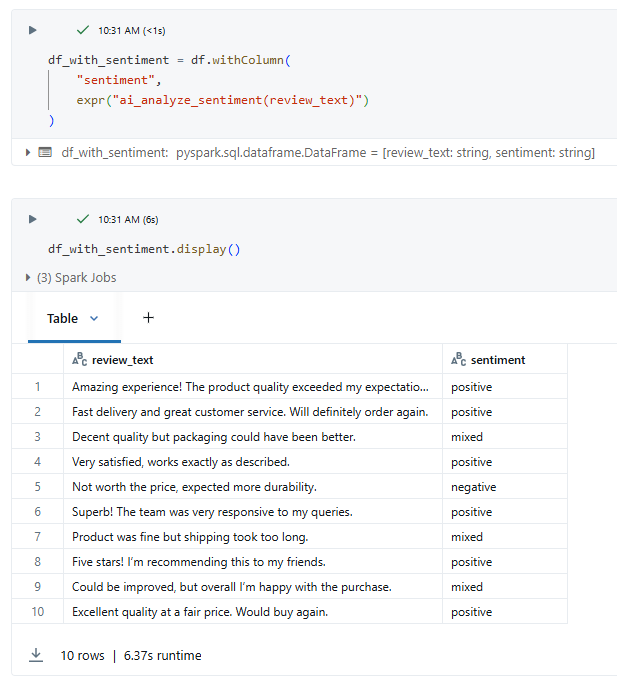
You can use the ai_analyze_sentiment, which will give you the sentiment based on the input text. A great tool if you need to classify reviews as positive, neutral or negative. In the picture below, you can see the result of a simple query with this function.
Databricks proposes the ai_fix_grammar function, which allows you to automatically check the grammar of text input. An example of this function is given below.

The gen_ai function enables you to input a custom prompt, much like the well-known chatbots like ChatGPT or Gemini.
In this example, we asked the model to list the top 5 places to visit in Rome.

The full list of supported ready-to-use AI functions can be found here. Some use cases are sentiment analysis, classification based on labels, correcting grammar mistakes, generating a response to a prompt, masking data, computing similarity scores between texts, summarizing text, translating text, forecasting a time series, etc.
General-purpose AI Function
The general-purpose AI function ai_query will enable you to quickly deploy Generative AI using Databricks-hosted models, while also allowing for fine-tuning if necessary. On top of this, you can choose to use a model hosted outside of the Databricks environment and connect via an endpoint, which gives you a lot more flexibility in comparison to the ready-to-use AI functions. More info here.
An example use case is to give the summary of a text, in this case, a 100-character summary for a text describing New York. The possibilities of this general-purpose function are limitless.

Practical use
The AI functions are designed to work in SQL and PySpark. They can easily be used in combination with dataframes, tables and views to create new columns or generate output based on the content of the table. For instance, in the case of sentiment analysis, the AI function will enable you to create a new column with the positive/neutral/negative sentiments for every review. This makes it highly scalable and practical to use.
Example for a view:

Costs
Databricks uses DBU (Databricks Units) to compute resource usage and calculate costs.
Costs tied specifically to the AI Functions will depend on the number of tokens processed by the AI model and can be estimated here.
A single run for a table with 1M rows, 35 input tokens per row and 35 output tokens per row is estimated at $36 in AI-specific costs. The runtime is estimated at 40 minutes. As a rule of thumb, 1 token is equal to approximately 3 string characters.
It is very important to only feed the required data to the AI model, so do not feed unnecessary columns; this will increase costs substantially.
We recommend only using AI functions on columns with a small amount of data to keep the costs under control.

Performance
Applying AI functions on an ETL load could slow down the process significantly. It is recommended to only run AI Functions incrementally to minimize regenerating output with AI as much as possible.
Even though AI functions are optimized to work as efficiently as possible, they will always be more expensive in time and costs in relation to standard SQL and PySpark transformations due to the heavy use of GPUs when applying AI models.
Conclusion
Databricks AI Functions have the potential to simplify the use of Generative AI and ML within the Databricks environment. You can now easily leverage the power of AI with the ready-to-use AI functions to translate text, extract sentiment, mask data and much more. The general-purpose function allows for more flexibility and enables the more experienced data analysts to choose their preferred external or Databricks-hosted AI models.
However, keep in mind that AI operations can significantly slow down jobs and come with high computational costs. We recommend running AI queries only on small, relatively stable master datasets that don’t change frequently.