


This article explores how the new Expression Context property transforms calculated columns into dynamic, personalized, and memory-efficient building blocks in Power BI semantic models.
1. Introduction
Power BI's April 2026 update introduced user-aware calculated columns — a quietly named but far-reaching addition to semantic models.
What changed:
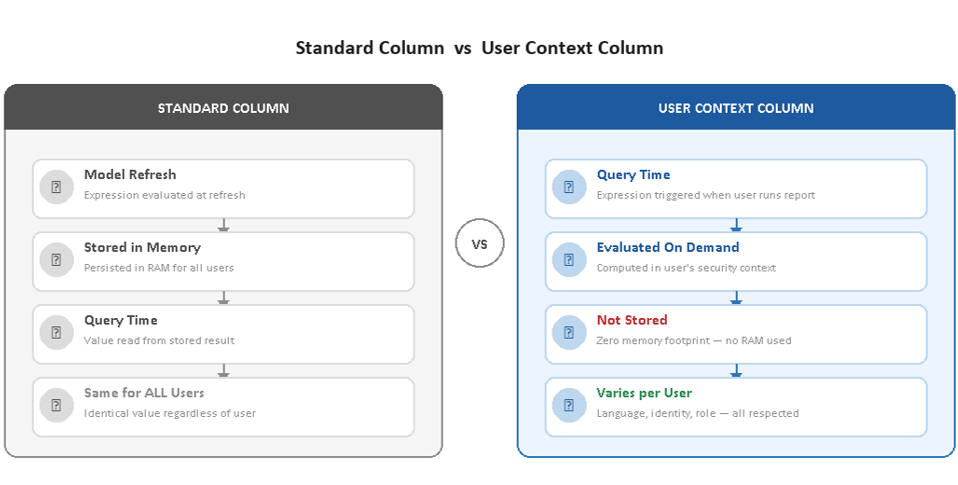
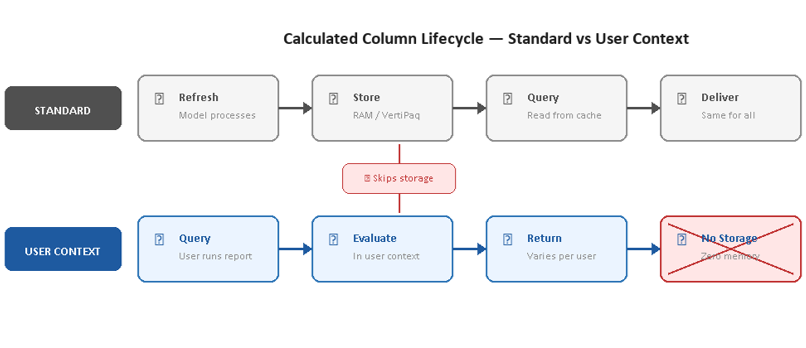
- Before: calculated columns were static — computed at refresh, stored in memory, identical for every user
- Now: by setting the Expression Context property to User Context, the column becomes dynamic — evaluated at query time, within the user's active security boundary
💡 What first appears to be a localization feature turns out to be something broader: a mechanism for rethinking how calculated columns are designed, stored, and used across the entire semantic model.
2. How It Works
Standard calculated columns follow a simple lifecycle: expression evaluated row by row at refresh → result persisted in memory. User-aware columns break this pattern in three meaningful ways.
| Standard Column | User Context Column | |
|---|---|---|
| Evaluated | At model refresh | At query time |
| Stored in memory | ✅ Yes | ❌ No |
| User-aware DAX | ❌ Not available | ✅ Unlocked |
| Security context | ❌ None | ✅ Active RLS |
Five DAX functions unlocked by User Context:
- USERCULTURE() — user's browser language / locale
- USERPRINCIPALNAME() — user's email address
- USEROBJECTID() — user's Azure AD object ID
- USERNAME() — user's display name
- CUSTOMDATA() — custom string passed via connection
💡 Row-by-row semantics remain identical to standard columns. RELATED and RELATEDTABLE work as expected. Values vary by user, not by report or visual.
3. Key Benefits
- 🌍 Personalized reports from a single model — no parallel model versions or separate reports per language or role
- 💾 Leaner models — row-level logic exposed as a filterable column with zero memory cost
- 🔐 Simplified security — RLS delivers blank values (not errors) for restricted users, keeping one unified report
- ☁️ Direct Lake on OneLake support — unmaterialized columns enable calculated columns in storage modes where materialization was previously unsupported
4. Step-by-step guide
To make a calculated column user-aware, nothing is more easy.
- Enable the preview : File > Options & Settings > Options > Preview Features > check the User-Aware Calculated Columns box
- In model view, click on your calculated column > go to the Properties pane > Advanced Options > Expression Context > choose for User Context
5. Use Cases
🌍 Use Case 1 — Localization
The problem:
- Standard columns hold one fixed value — English for everyone
- Workarounds mean duplicating columns per language or maintaining separate report versions
The solution:
- One column, one expression — value adapts to each user's culture at query time
- An English user sees Sunday, a French user sees dimanche — from the same column
- No report duplication, no language-specific layouts

⚠️ Important design consideration — slicers: ->
- Slicers store the visible translated string as their selection state
- If the report is opened in a different language, the stored selection no longer matches
- Fix: set the Group By Columns property to a stable numeric counterpart (e.g., Day of Week Number) → filter state becomes language-agnostic
💾 Use Case 2 — Virtual Calculated Columns
Sometimes, calculated columns in Power BI can be too storage-intensive to keep in your model. A classic workaround is to use measures instead, as they avoid storage costs. However, measures have limitations—they cannot be used in slicers or as filter fields in visuals.
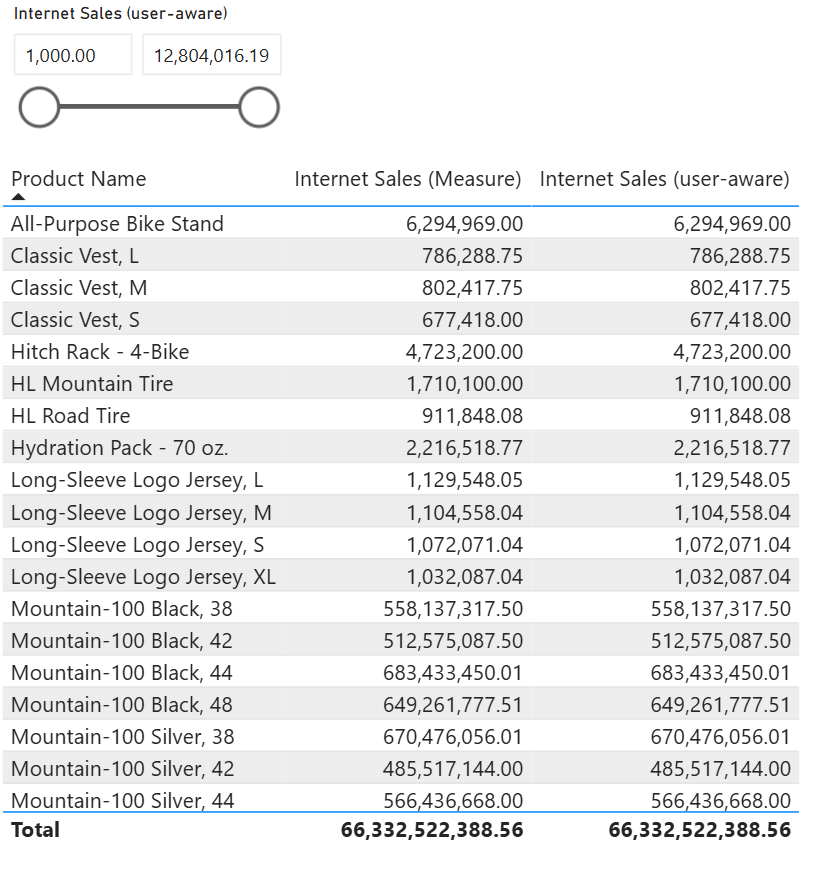
This is where user-aware calculated columns come in. They retain the properties of classic columns, meaning filtering and slicing are possible, while remaining non-materialized—so they don’t consume storage. And with this new preview feature, there’s no need for Tabular Editor or DAX Studio: it’s natively supported in Power BI!
The classic trade-off:
| Materialized Column | Measure | |
|---|---|---|
| Sliceable/filterable | ✅ Yes | ❌ No |
| Memory cost | ❌ High | ✅ Zero |
| Logic centralized | ✅ Yes | ✅ Yes |
User Context breaks the trade-off:
- Column appears in field lists, filters, and slicers
- Never stored in memory — zero memory footprint, no processing at refresh
- Simple arithmetic is pushed to the storage engine (negligible cost for tables under 100M rows)
- Logic stays centralized in the model
💡 Rule of thumb: simple arithmetic on columns of the same table = storage engine push-down = essentially free. Complex expressions with iterators or cross-table lookups = formula engine row-by-row = watch performance on large tables.
🔐 Use Case 3 — Securing Sensitive Columns
The OLS problem:
- Object-Level Security (OLS) hides the column entirely → report throws an error for restricted users
- Forces designers to maintain separate report pages or files per role
The User Context alternative:
- Column stays visible in the field list
- Report renders without error for all users
- Restricted users see BLANK — admins see real values — same report
Architecture rules:
- Store sensitive data in a hidden table (e.g., CustomerIncome)
- Apply an RLS filter returning FALSE() for restricted roles
- Expose data via LOOKUPVALUE() in a user-aware calculated column
⚠️ No relationship between the hidden table and the rest of the model — a relationship would propagate the RLS filter broadly and blank out unrelated data.⚠️
6. Limitations
Four firm constraints to be aware of:
| Constraint | Reason |
|---|---|
| ❌ Cannot be used in relationships | Relationships require materialized columns for internal index structures. Composite keys and segmentation columns must remain standard. |
| ❌ Cannot be referenced by standard calculated columns or tables | Any direct or indirect dependency causes a model validation error. |
| ❌ Cannot be referenced in RLS expressions | RLS filters must be resolved before user-aware evaluation begins — circular dependency not permitted. |
| ⚠️ Performance scales with expression complexity | Simple arithmetic → storage engine push-down → negligible. Complex DAX with iterators or table functions → formula engine row-by-row → can be costly on large tables. |
⚠️ Preview status: as of May 2026, user-aware calculated columns are still in preview. Production use should be evaluated carefully — Microsoft may refine behavior before general availability.
7. When to Use
✅ USE User Context when…
- Column values should vary by user language or culture
- Row-level expression is simple arithmetic on columns of the same table
- You need a column in slicers/filters but want zero memory overhead
- You want to soft-hide sensitive data via RLS (blank instead of error)
- You are building for Direct Lake on OneLake
🚫 AVOID User Context when…
- Column is the key side of a relationship (must stay materialized)
- Expression involves iterators, table functions, or complex branching
- Column must feed a calculated table or standard calculated column
- Query response time is critical and the table has >100M rows
- The column needs to appear in an RLS filter expression
8. Conclusion
User-aware calculated columns represent a genuine inflection point for Power BI semantic model design.
The decision rule:
- Use user-aware columns when the expression depends on the user, or when the expression is simple enough for the storage engine to evaluate at minimal cost.
- Stick with standard calculated columns when materialization is needed for relationships, or when query performance is non-negotiable.
The virtual calculated column pattern in particular, is likely to have a lasting impact — exposing calculated fields to the UI without paying storage cost. As the feature matures toward general availability, best practices and benchmarks will follow. For now, the capability is real, and for the right scenarios, it is already worth using. Contact us for more insights.
