

Over the past couple of years, Generative AI (GenAI) has moved from proof of concept to production in countless enterprises. As organisations race to embed large language models (LLMs) into chatbots, copilots, and agents, one question consistently emerges: Is it secure?
Most of the focus, understandably, has been on securing the data, ensuring that sensitive information doesn’t leak into model prompts or outputs. But that’s only part of the story. Securing GenAI applications themselves, the infrastructure, interfaces, and internal APIs, is just as critical.
In this insight, we share practical, field-tested approaches to securing GenAI apps across the full stack. It’s written for data engineers, data scientists, and architects who may be newer to web and application security but who are now building production-grade GenAI applications.
Security Still Starts With Infrastructure
Before diving into app logic, it’s important to remember that traditional infrastructure and network security still apply, especially in the GenAI space.
Every GenAI system we deploy starts with tightly controlled, private networking. Resources are placed in isolated subnets, endpoints are kept private by default, and no part of the system is exposed to the public internet unless explicitly required. This layered network design, web tier to middle tier to data tier, remains the bedrock of secure application design.
To make this repeatable, we use Terraform to manage infrastructure as code. This ensures that networking, identity, and role-based access are not only in place, but also consistent across environments. In most projects, our acceleration kits already include these security baselines out of the box.
GenAI Apps = Two Web Apps to Secure
In typical GenAI use cases, there are two core components that must be secured independently:
- The frontend: the user interface where end-users interact with the LLM.
- The backend: Where answers are formulated, models are called, embeddings are stored, and system logic resides.
Although tightly coupled, each of these layers has its own authentication and authorisation concerns. A secure system requires careful handling of how users authenticate to the frontend, and how that frontend securely talks to backend services.
Authentication in the Frontend: Easy vs Flexible
When securing the frontend of a GenAI app, developers have two main approaches.
The first is to use Azure App Service’s “Easy Auth”, which allows for configuration-based authentication without writing any code. It manages the login flow, ensures only authenticated users access your APIs, and integrates directly with Azure Entra (formerly Azure AD). Easy Auth's no-code setup is the configuration that you apply directly to your Azure App Service. This is powerful because you can even automate its setup with your favorite infrastructure-as-code tooling or create policies that disallow applications that don’t have Easy Auth to ensure organisation-wide coverage. It’s fast and simple, but it comes with limitations. Easy Auth is primarily designed for browser-based flows and offers limited support for authorisation logic or user role handling. With the rise of agents, we see more API-to-API communication as GenAI apps are embedded into tools, and "Easy Auth" is not intended to for these workflows.
For projects that require fine-grained access control, such as role-based access views, the preferred approach is to use MSAL, Microsoft’s authentication library. This allows you to control authentication in code, define roles and scopes, and apply business-specific rules. With MSAL, your application can identify not only who the user is, but also what they’re allowed to do.
This is the difference between authentication (who you are) and authorisation (what you can do), and GenAI applications increasingly require both, especially for role-based access to underlying data.
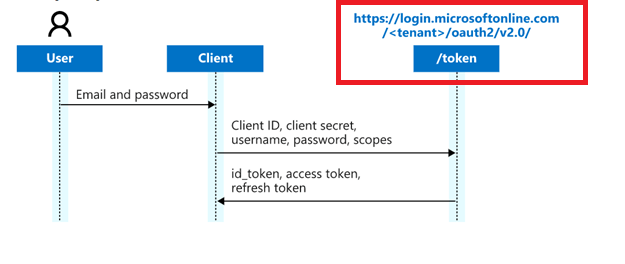
The image above illustrates what an authentication flow looks like when using MSAL. In this setup, your application includes code that redirects users to a Microsoft-hosted sign-in page. Once the user successfully signs in and has the necessary permissions, they’re redirected back to your app. Along with the redirect, your app receives key identity information, such as the user's ID, group memberships, and other claims.
Here's how the flow works:
- The user visits your app and is redirected to the Microsoft login page.
- They authenticate using their organisational credentials (e.g., Entra ID / Azure AD).
- Your app receives tokens that include:
- id_token: who the user is
- access_token: what they can access
- Optional claims like group membership, user roles, or scopes
- Your application uses this token data to make authorisation decisions.
This added context is what makes it well-suited for workflows that rely on authorisation logic.
While MSAL requires some coding, it’s still simpler and more secure than building your own authentication system from scratch. You don’t need to handle password storage, implement login flows, or manage user credentials directly.
Securing API-to-API Communication

App-level security isn’t just about user interfaces. Modern web apps often rely on a Backend-For-Frontend (BFF) that serves as an intermediary between the UI and the actual orchestrator backend.
In secure deployments, this BFF component authenticates to the backend using its own application identity, typically via Azure Entra and app roles. The flow works as follows: the user logs in via the frontend, the frontend calls the BFF, and the BFF obtains a token to communicate with deeper backend systems.
This is where app roles come into play. App roles are a feature in Azure Entra that lets you define specific permissions or roles within your application, such as "Reader," "Contributor," or "Admin", and assign them to users or other applications. These roles become part of the token issued by Microsoft Entra ID (formerly Azure AD), and your application can then read those roles to determine what actions the user or service is allowed to perform. In short, think of app roles as the cornerstone of role-based access control (RBAC) for your APIs.
When implemented properly, app roles enable robust authentication and authorisation at every hop in your GenAI stack: from the frontend to the backend-for-frontend (BFF), and from the BFF to internal APIs, ensuring secure and predictable behavior throughout your architecture.
Our Recommendation
Choosing the right authentication setup depends on your architecture and security needs. Below are three common patterns to guide your decision:
| Scenario | Frontend | Backend Auth | When to Use | Pros | Cons | |
| 1 |
Flat Network + No Authorization Needs (Single web app: frontend + backend together) |
Easy Auth |
None (same app) |
GenAI apps where both UI and logic live in one web app |
Easiest to deploy and manage No custom code Great for teams just starting out |
No support for API-to-API communication |
| 2 |
Tiered Network + No Authorization Needs |
Easy Auth |
App roles (BFF → Backend) |
Apps with internal services but no user-specific permissions |
No-code frontend authentication App roles secure backend calls Supports API-to-API authentication (e.g., for agents, integrating your GenAI app in existing tools) |
No fine-grained access control |
| 3 |
Tiered Network + Authorization Needs |
MSAL |
App roles (BFF → Backend) |
Apps that require role-based access control or business rules |
Full control over permissions Works for multi-hop API flows |
Requires code-based auth setup in the client |
Let’s Not Forget the Data
This insight focuses on securing the application layer, but we still need to address the obvious: data security still matters enormously.
Even if app logic is airtight, GenAI services still need guardrails around prompt injection, toxic output, sensitive data exposure, and more. Your security design must include:
- Governance on what data enters the LLM.
- Retaining row-level security of the data coming out of the source systems.
- Logging and auditability of prompts and responses.
GenAI apps should never be considered secure unless both the infrastructure, data and the application layers are protected.
Final Thoughts: Don’t sleepwalk into a data breach
As GenAI becomes more deeply embedded into enterprise processes, from customer service to HR to finance, security must scale with it.
That means:
- Using infrastructure as code to enforce security patterns
- Choosing the right authentication model for your app's use case
- Managing both user-level and service-level access control
- Treating data protection as foundational, not optional
At element61, we believe in building GenAI applications that don’t just work, but that also scale securely across organizations.
If you're developing or planning GenAI apps and want to ensure security isn't an afterthought, we're ready to help. Our experience spans both the cloud-native and AI-native worlds, and we work closely with your teams to secure everything from vector stores to endpoints.
Want to talk GenAI security
Reach out to us at element61, we’re happy to share more.