

Microsoft keeps adding to Fabric. At Build 2026 it added the application layer — the last piece needed for a genuinely end-to-end platform, from operations through to analytics.
1.1 The pattern
The individual announcements matter less than the trajectory they trace:
- 2023 — an analytics platform. Fabric launches as one SaaS roof over Power BI, Synapse, and Data Factory. The pitch: stop stitching tools together. It reaches general availability that November.
- 2024 — a data platform. At Ignite, SQL database in Fabric arrives in preview, bringing operational and analytical workloads together in a single platform for the first time.
- 2025 — an intelligent platform. Copilot, data agents, and AI woven through the experience, while SQL database in Fabric reaches general availability — framed by Microsoft as a milestone in unifying operational and analytical data for the next generation of AI-powered applications.
- 2026 — an application platform. With Fabric Apps, you can now build and run web applications directly on Fabric, with your data and semantic models as the backend.
When that SQL database showed up at Ignite 2024, plenty of us asked the obvious question: why put a transactional database inside an analytics SaaS when Azure SQL already exists? Its most straightforward use cases were operational interactions — feeding translytical task flows or the Planning item — and Fabric Apps now completes that picture. An operational app needs exactly the kind of governed, transactional store that SQL database in Fabric provides, and that database now has an obvious job to do.
The signal was there early, too. At the 2024 launch, SQL database in Fabric was already pitched around making AI apps faster to build, so the application angle was never entirely absent.
1.2 Three announcements that actually matter
Build 2026 covered a lot of ground. Three announcements stand out.
Fabric IQ — the context layer. It's Microsoft's business-context layer, spanning Microsoft 365 work data, your data estate, and knowledge bases. The point is to give AI agents consistent definitions of entities, relationships, and metrics to reason over, instead of leaving them to guess. Microsoft puts it well: AI without semantic context is a confident guesser. If you've spent years building governed semantic models, that's a satisfying thing to hear. The semantic layer is no longer just the thing that powers reports; it's the thing that makes AI trustworthy.
Agent Skills for Power BI — agents that build. These let developers prompt an AI agent to build and refine semantic models and reports. The development surface itself becomes agentic: you describe the model or report you want, and the agent assembles it.
Rayfin — the engine room. Rayfin is an open-source SDK and CLI that lets developers and coding agents define and deploy a full application backend in code, running on Fabric with enterprise-grade security, governance, and scale from day one. Think managed backend-as-a-service. Partners like Replit are pitching a path from idea to production in hours rather than months: agents write the code, Fabric ships it safely.
Rayfin is the engine underneath Fabric Apps. When you scaffold a Fabric App, a rayfin.yml file configures the backend, and the Rayfin CLI is what builds and deploys it. Fabric Apps is the item type you see; Rayfin is what makes "an application running on Fabric" literally true. Between them, they move Fabric into a different category.
1.3 What a Fabric App is
A Fabric App is a new workspace item type for building and distributing web applications inside Fabric: browser-based programs with built-in Entra authentication, hosted as a managed service. That's a real departure. Instead of choosing from pre-defined reports, dashboards, and data agents, you can build whatever interactive experience you want on top of your governed data.
The one thing to get right, especially when you explain this to stakeholders, is that there are two kinds of Fabric App:
- The operational app (the default). When you create one, it provisions a managed SQL database as a child item, which the app reads from and writes to via a GraphQL API. This is the transactional, write-enabled flavor — a real application backend.
- The analytical app, or “data app.” This template connects to a published semantic model and queries it in DAX, exactly as a Power BI report would, and it does not provision a SQL database. This is the visualization-as-code, custom-dashboard flavor.
This is where the earlier point lands. The operational app gives SQL database in Fabric an obvious home: the app's transactional store, governed, mirrored into OneLake, and native to the platform. The data app is its analytics-facing twin. One item type, both halves of the same loop.
Source: Introducing Rayfin: A new AI-first way to build, deploy, and govern (Microsoft Fabric Community)
1.4 Will Data Apps replace Power BI reports
No. But it's no longer a silly question to ask, because data apps and reports aren't really the same kind of thing.
A data app is code from top to bottom. Every visual is something you write: the DAX query in its own file, the chart definition, the code that wires them to the semantic model. No canvas, no formatting pane, no drag-and-drop. Most BI developers don't write TypeScript and React, which leads to a practical conclusion: you'll need a coding agent to build and maintain a data app. That isn't an optional convenience — it's how the workflow is designed to be used.
In return you get speed and freedom. With an agent, a polished bespoke dashboard comes together fast, usually faster than building the same custom design in a Power BI report, and you're not boxed in by what the canvas allows. You control the visuals completely, and report-specific logic can sit in the reporting layer instead of being forced onto the semantic model.
Data apps also finally unlock a native way to combine multiple semantic models in the same report. A Power BI report binds to one model at a time, so blending metrics that live in separate models has always required a workaround. A data app lifts that restriction: it can query several published models side by side and relate them within the app, which makes a cross-domain view — finance figures next to operational metrics, each from its own governed model — something you build directly rather than engineer around.
The cost is everything that comes with depending on generated code: keeping visuals and apps consistent, maintaining them over time, governing them, building new skills on the team, and paying for the tokens that produce the code in the first place.
So data apps don't replace reports. Power BI is more mature, more consistent, and still the right call for the self-service majority. Data apps are a new tier on top: a fit for enterprise BI teams that can support a code-first, agent-driven workflow, or for organizations that have hit Power BI's visualization ceiling. Power BI for the 80%, data apps for the demanding 20% where flexibility is the real constraint.
1.5 The scenario that actually changes things
The data app gets the headlines. The operational app is the one that quietly changes how teams work.
Write-back has been the missing piece in the Microsoft BI stack for years. The first real attempt to close it inside Power BI was translytical task flows, mentioned earlier, which let report users write values straight back to a data store from within a report through a user data function. It was a genuine step forward, but still a feature bolted onto the reporting layer rather than an application in its own right. Before that, letting business users edit data meant stitching together an embedded Power App, a Power Automate flow, and a SQL endpoint. Most Fabric and Power BI practitioners have either built that stack or deliberately avoided it. The operational Fabric App replaces the whole thing with one governed item: a real web app, authenticated with the user's existing Entra identity, writing to a managed transactional database that mirrors straight into OneLake.
That makes a handful of previously painful scenarios straightforward:
- Planning and budgeting input — figures entered by the business, instantly available to the warehouse and reports. For this scenario Fabric also has a dedicated Planning item, purpose-built for budgeting and forecasting; the operational app is the more general-purpose, code-first alternative when planning is only part of a wider application.
- Master data maintenance and exception handling — correcting, enriching, or approving records inside a governed app rather than in spreadsheets.
- Operational decision loops — surfacing a model's output (for example, supply-chain or replenishment proposals), letting a planner accept, adjust, or push it back, with every action captured operationally and reflected in analytics in near real time.
That's the loop closing. The app generates operational data, it lands in OneLake, semantic models and agents read it, and the insight flows back into the app where someone acts on it. Analytics and operations stop being two platforms with ETL in between, because they're now one.
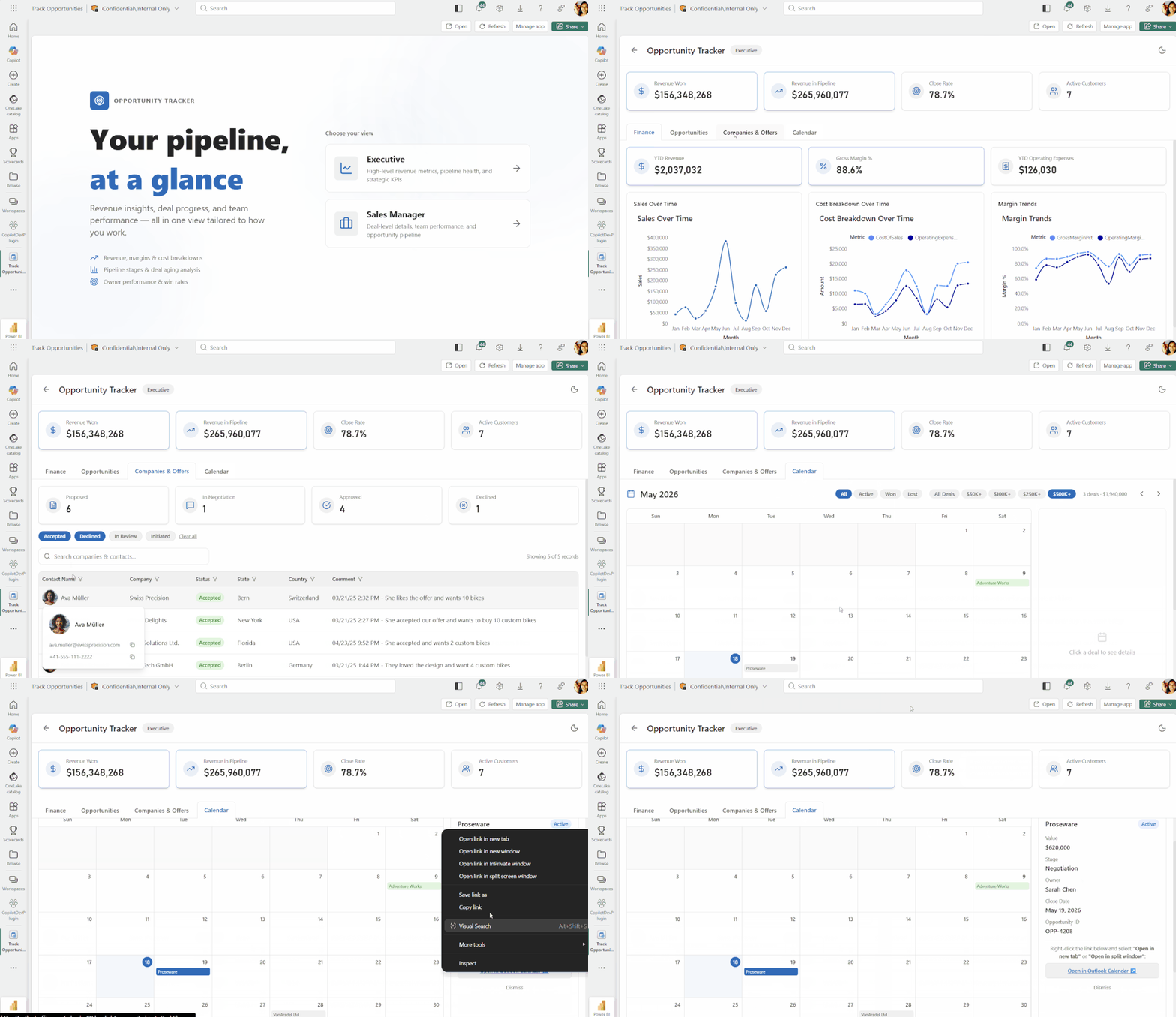
For a real Fabric app in the wild, take a look at the official Microsoft Fabric Roadmap.
1.6 Where we land
Most platform announcements are technical housekeeping. This one isn't. Fabric Apps, and the Rayfin backend under them, mark the point where Fabric stops being only a place to analyze your data and becomes a place to build the applications that act on it.
For most organizations, the smart first move isn't to rush a data app into production. It's to be clear about where each capability fits:
- Operational apps for governed write-back, planning, master data, and decision loops that previously required brittle Power Apps + Power Automate plumbing.
- Data apps for the high-fidelity, high-flexibility reporting scenarios where Power BI's ceiling is the constraint — adopted by teams with the maturity and agentic workflows to support them.
- Power BI reports for everything else: the simple, self-service majority, where they remain the most robust and cost-effective choice.
Fabric has changed category. The job now is to be deliberate about which tier each use case belongs in, rather than getting swept along by a good demo.
Trying to work out where Fabric Apps fit in your platform, or whether a specific use case calls for an operational app or a data app? That's the kind of architecture decision we help our clients think through. Contact us now!