

Why security in analytics matters
If analytics is where decisions happen, then it is also a domain where risk concentrates. Moving your analytics setup to the cloud raises legitimate questions for your organization about how personal data is handled, how access is governed, and whether controls can keep up with regulatory change. Qlik complies with major global laws such as EU and UK GDPR, Brazil’s LGPD and California’s CCPA [Qlik Trust & privacy], which serves as a useful baseline for any organization evaluating a cloud analytics platform.
Qlik publishes its external certifications and attestations on its public Security Trust Center. Certifications include, but are not limited to: ISO 27001, ISO 27017, ISO 27018, SOC 1, SOC 2, SOC 3, HITRUST and additional frameworks for government and regional requirements. Furthermore, Qlik’s product help site provides an overview of how the Qlik Cloud platform aligns with recognized security and compliance frameworks. Qlik Cloud follows a secure-by-design approach and incorporates the aforementioned independent audits and certifications, such as ISO, SOC, and HITRUST, into its cloud architecture. [Standards and compliance]
Beyond certifications, many organizations should also address the complexities of (international) data transfers, as these could directly impact compliance and lead to operational risks. Qlik participates in the EU – U.S. Data Privacy Framework, along with its UK and Swiss extensions, and explicitly describes Qlik Cloud as an encrypted, “no view” service in which Qlik personnel cannot access your tenant’s content data. Together, these measures should help your organization in addressing cross-border transfer risks and vendor access risk. [Data Privacy Framework Policy]
A recent incident showcases why security and trust matter when choosing your organization’s future cloud analytics platform. In September 2025, Adobe Analytics experienced a cross-tenant data exposure caused by a software bug. This temporarily allowed tenant content from one organization to appear on the tenant(s) of other unrelated organizations. This real-world incident demonstrates why tenant isolation, encryption, and clear governance controls are essential considerations when your organization evaluates a cloud analytics platform.[Adobe Analytics bug leaked customer tracking data to other tenants]
What Qlik Cloud offers to protect your data
1) Independent certifications and privacy commitments
Protecting data in the cloud requires more than paper promises: it demands evidence backed up by transparent practices. Qlik Cloud provides both through its secure-by-design architecture and a comprehensive set of certifications and privacy practices. The Qlik Trust Center centralizes current certifications, SOC reports, and policy documents, making them easy to reference during procurement or vendor risk assessments. In addition, Qlik’s evaluation guides explain how standards such as ISO 27001 (information security management), ISO 27017 (cloud security), and ISO 27018 (cloud privacy) apply specifically to Qlik Cloud. This in turn makes it easier for your organization to align Qlik Cloud’s security standards with your internal controls and compliance requirements. [Trust and security at Qlik] [Qlik Security Trust center] [Standards and compliance].
On the privacy side, Qlik outlines its role as a processor for customer personal data in Qlik Cloud, details privacy by design practices, and provides product specific notices so you can understand which data Qlik hosts and for what purpose. For EU – U.S. data transfers, Qlik’s Data Privacy Framework Policy sets the legal basis and commitments in a single document that your legal team can review. [Qlik Trust & privacy] [Qlik Product Privacy Notice] [Data Privacy Framework Policy]
Why this helps: Qlik’s transparency gives your organization’s legal and governance teams clarity on roles and responsibilities, which in turn facilitates the adoption of the Qlik Cloud platform.
2) Encryption by default, with Customer Managed Keys, should you need them
Every tenant in Qlik Cloud is logically isolated and encrypted. Data in transit uses TLS 1.2, and data at rest uses AES 256 GCM, with tenant unique keys managed by Qlik’s encryption service. If you operate in a regulated environment or want to control encryption key lifecycle, Qlik Cloud supports Customer Managed Keys (CMK) that integrate with AWS KMS. Meaning that your organization can bring its own key for tenant level at rest encryption.
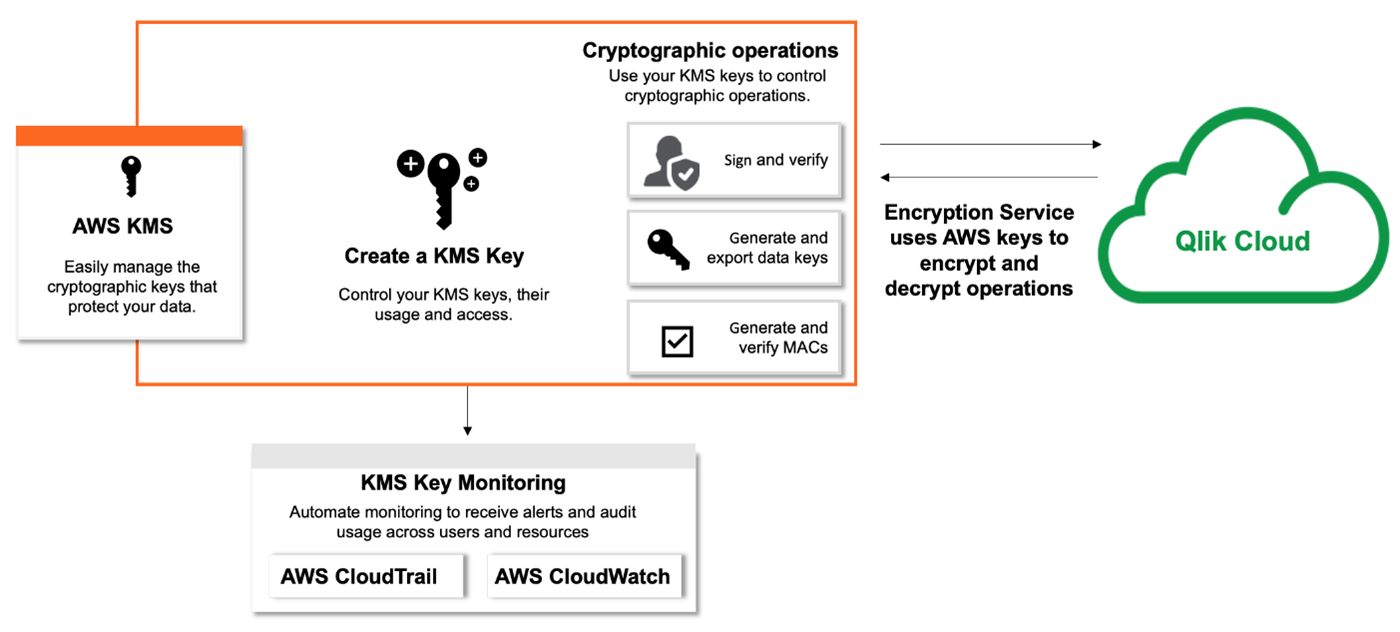
Qlik also clarifies scope and limitations, for instance, CMK is not used for data in motion and is not supported in certain edge components [Tenant encryption].
Why this helps: Default encryption meets most organizations’ baseline, while CMK provides a straightforward path when for instance, industry regulations require additional customer control.
3) Simple to operate identity, roles and least privilege access
Access control in Qlik Cloud separates tenant-wide security roles from space roles for content, which keeps governance clear and reduces accidental over-privileging. Built-in roles cover administration and creation scenarios, and you can assign roles to users or groups directly in the Qlik Cloud Administration activity center. [Roles and permissions for users and administrators] [Assigning security roles and custom roles]
It is best practice to have groups automatically synchronized from your Identity Provider (IdP), such as Microsoft Entra ID, which means you can manage group membership centrally and use SCIM provisioning (if supported). Alternatively, Qlik Cloud also supports custom groups (groups not defined within your IdP) on the tenant whenever you need additional flexibility. Both IdP groups and custom groups can be assigned roles. [Manage users with groups]
At the content layer (e.g., Qlik dashboards and data files), spaces provide governed collaboration and a structured deployment pipeline. Shared spaces enable controlled co-development with fine-grained roles, while Managed spaces are used to publish and distribute governed production-grade apps to larger audiences.
Why this helps: Qlik Cloud’s access model is predictable and easy to use for administrators, as entitlements can be assigned to mirror the collaboration patterns your teams already follow, while aligning with identity governance processes managed through your IdP. [Managing permissions in shared spaces] [Manage users with groups]
4) Row and column security with Section Access
Beyond app-level permissions, developers can dynamically reduce data inside Qlik applications through the use of Section Access. Section Access is defined in the app’s load script by mapping users and/or groups to the data fields and/or values (within data fields) that should be visible when end-users open the app [Managing data security with Section Access].
Why this helps: You can satisfy the least privilege principle at the data level without duplicating Qlik applications for each individual or target group.
For a deeper dive into Section Access, check out our previous insight here.
5) Network control and regionality
If your organization is required to restrict who can reach your cloud tenant, Qlik Cloud offers an IP allowlist functionality that only permits access from specified IPv4 ranges. [Allowlisting domains and IP addresses] [Managing IP allowlists]
Why this helps: IP allowlists ensure that only traffic from trusted networks can access your Qlik Cloud tenant, reducing potential exposure to unauthorized or malicious connections.
How easy is it to set up and run
The onboarding workflow includes tenant configuration and region selection as part of its initial steps. The first user automatically becomes the service account owner and initial admin; this user selects the cloud tenant region and invites other users.
Roles can be assigned manually or via IdP groups, and the User Default permissions can be adjusted to keep the least privilege principle intact from the very start.
Spaces are created by admins or users with the necessary permissions and come with straightforward member role assignment.
Should your organization require further control over encryption methods, Customer Managed Keys can be easily configured in the Administration center by registering your AWS KMS key. The help guide covers prerequisites and step by step configuration, including the ability to change providers for existing tenants [help.qlik.com].
For additional tenant perimeter control, your organization can allowlist IPs directly in the admin console. Likewise, documentation provided by Qlik is easy to follow and calls out common pitfalls to avoid, such as, including your own IP address in the allowlist to avoid lockout and that private RFC1918 ranges are not supported [help.qlik.com].
What does this mean for your organization:
- Risk reduction with proof: You can point internal and external stakeholders to independent certifications and privacy documentation that is product specific and up-to-date
- Security by default, control when needed: Encryption is always on, and CMK is available for stricter data classifications or regulatory needs
- Governance and granular access: Roles, groups and spaces can be mapped to your organization‘s structures, while Section Access is able to handle granular data access on the user or group-level within Qlik applications
- Clear shared responsibility: Qlik operates as processor in Qlik Cloud, customers decide what to upload and who can access it, and Qlik’s no view posture limits vendor access to your analytics content
Shared Responsibility: What Qlik Handles vs. What You Manage
| Area | Qlik Cloud (SaaS) | Qlik Sense On-Prem (QSE) | Why it matters |
|---|---|---|---|
| Infrastructure & Patching | Fully managed by Qlik | Customer manages servers, OS, patches | Major reduction in operational workload + faster security updates |
| HA & Disaster Recovery | Built-in regional HA/DR | Customer must architect and test DR | Strong availability without infra engineering |
| Compliance & Certifications | Qlik provides platform-level audits (SOC/ISO/etc) | Customer must validate entire environment | Simplifies procurement & internal security reviews |
| Upgrades & Feature Delivery | Continuous automatic updates | Manual and time-consuming upgrade projects | Faster access to features + eliminates upgrade cycles |
| Elastic Scaling | Automatic scaling | Manual cluster expansion | Supports growth without hardware planning |
| Identity & Access Management | Modern SSO (OIDC/SAML), SCIM provisioning | AD/LDAP/ADFS infra required; more manual | Simpler enterprise IAM integration |
| Encryption & CMK | Default encryption + optional CMK | Customer fully manages crypto/keys | Strong defaults with option for higher control |
| Network Security | IP allowlists + published static IPs | Customer must build/maintain firewall/VPN structure | Strong security with reduced network admin burden |
| Operational Cost Model | Opex subscription; no hardware | Capex hardware + ongoing infra cost | Frees budget + reduces long-term cost of ownership |
| Support Ownership Model | Qlik owns platform responsibility | Split responsibility (software vs infra) | Clearer accountability and faster resolution |
Qlik Cloud significantly reduces the operational burden compared to an on-premises Qlik setup. Many tasks that previously required your organization’s time and resources, such as infrastructure management, patching, and disaster recovery are now handled by Qlik as part of its fully managed Qlik Cloud SaaS model. This shift means your organization can shift more resources to analytics and governance rather than using them to maintain servers and plan upgrades.
In short, Qlik Cloud simplifies operations by moving the majority of responsibilities from your organization to Qlik, while still giving you control where it matters most.
Frequently Asked Questions
- Does Qlik have access to my organization’s data on our Qlik Cloud tenant?
No, Qlik does not have access to the data files stored on your Qlik Cloud tenant. Qlik Cloud is an encrypted no-view service, meaning Qlik personnel cannot access your data unless you explicitly grant Qlik access for support purposes [Qlik Trust & Privacy]
- Where is my organization’s data stored, and do I have a say in this?
Data in Qlik Cloud is stored in the region you select during the tenant set-up. Qlik maintains an up-to-date list of available regions and their associated backup regions to support data residency and compliance requirements. [Creating and configuring your tenant]
- How is user authentication managed in Qlik Cloud?
User authentication is typically handled via identity providers using either OpenID Connect (OIDC) or Security Assertion Markup Language (SAML), allowing centralized user management. However, the option to authenticate using Qlik accounts also exists as an alternative. Groups and users can be automatically synchronized using SCIM provisioning, if supported by the identity provider and Qlik. [OpenID Connect] [SAML for integration with identity providers]
- Does Qlik Cloud support Single Sign-On (SSO) and Multi-Factor Authentication (MFA)?
Yes, Qlik Cloud supports Single Sign-On (SSO) through integration with identity providers using OIDC or SAML. Multi-Factor Authentication (MFA) is also supported when enforced by the connected identity provider, as Qlik Cloud relies on the IdP’s authentication policies. For organizations not using an IdP, Qlik accounts can be used to authenticate, which also includes built-in MFA options. [OpenID Connect for integration with identity providers] [SAML for integration with identity providers] [Configuring multi-factor authentication (MFA)]
- How can I restrict access to my Qlik Cloud tenant and control permissions within the tenant?
You can restrict external access by defining which users are allowed to log in to your organization’s tenant. Additionally, more granular access control can be set up using IPv4 allowlists. Internal content access and permissions are managed through roles, groups, and spaces. Roles and groups can be assigned manually or synchronized from your identity provider, and spaces provide governed collaboration and publishing controls. Furthermore, for granular column and row level data access, section access can be implemented within Qlik apps [Allowlisting domains and IP addresses] [Roles and permissions for users and administrators] [Managing user groups] [How to Secure Your Qlik Sense Applications: Users, Access Rules, Section Access].
Conclusion and next steps
Choosing your organization’s cloud analytics platform is not only a question of available features and performance. It is also a question of governance fit, security and maintainability.
Qlik Cloud provides a strong baseline with audited controls, encryption by default, and layered governance that is administered with relative ease. Optional features such as Customer Managed Keys and IP allowlists are available should your policies or business context demand additional control.
How element61 can help your organization
Our team has extensive experience in setting up Qlik Cloud tenants, implementing governance best practices, and mapping roles and permissions for both the group and user level in accordance with the least privilege principle.
In addition, element61 is backed by an in-house dedicated data governance team, ready to help your organization meet compliance requirements and design tailored governance strategies whenever needed. If you are keen to learn more, do reach out via the element61 contact form.