


Introduction
Qlik Data Gateway is a solution designed to securely connect Qlik Cloud to on-premises data sources.
However, when working with large tables, specific challenges can occur. This insight covers one such challenge, namely scheduler timeout errors, and explains how SQL-side pagination offers a reliable and practical alternative for tables where no suitable incremental load field is available.
The use case
A customer required a migration from Qlik Data Transfer to Qlik Data Gateway.
An existing extraction script was already in place, incorporating extended incremental load logic to handle several business complexities, including the fact that the source company had been split into several legal entities.
The script connected to a Progress OpenEdge 12.2 database via ODBC and had been running reliably in the previous environment.
The problem
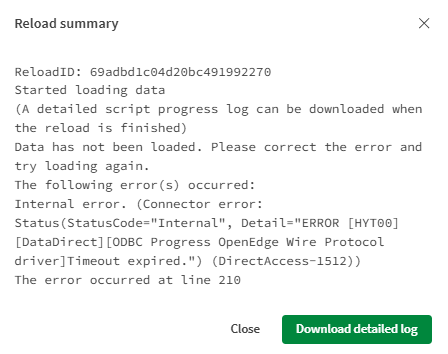
Following the migration to Qlik Data Gateway, the script executed without any issues when triggered manually via the Load Editor's Export Data function. However, when the same script was executed through the Qlik Cloud Scheduler, a timeout error occurred.
Why does the same script behave differently
The difference in behavior comes down to how each execution method manages the connection to the source system.
When a script is run manually in the Load Editor, the execution is tied to an active browser session. This session maintains an open, interactive connection with no enforced timeout, meaning the script can run for as long as needed.
When the same script is triggered via the Qlik Cloud Scheduler, there is no browser session involved. The script runs as a background server-side process and is subject to the Data Gateway's connection timeout settings. If the extraction takes too long, the connection will be terminated before the job completes.
In practice, this issue typically surfaces when the script includes large, non-fact tables that exceed several million rows and cannot benefit from incremental load logic. Tables without a date field, record number, or similar indicator simply cannot be loaded incrementally in a traditional sense, meaning the full dataset must be extracted in a single operation, which may exceed the gateway's timeout threshold.
The recommended solution: SQL-side pagination
For environments using an ODBC connection via Qlik Data Gateway to a database that supports OFFSET/FETCH syntax, such as Progress OpenEdge 12.2, the recommended approach is to paginate the extraction at the database level.
Rather than extracting all rows in a single query, the data is retrieved in smaller, manageable chunks. Each individual query remains well within the gateway's timeout threshold, and the full table is assembled incrementally, page by page, within the script.
This is the script for the Subroutine:
Sub Chunk (vInput_Database, vInput_Table, vInput_StoreLabel)
LET vChunkSize  = 500000;
LET vOffset     = 0;
LET vChunk      = 1;
LET vRowsLoaded = 1;  // Set to 1 to enter the loop

DO WHILE vRowsLoaded > 0

    // Reconnect fresh before every chunk
    LIB CONNECT TO 'Development:Lisa_ODBC_DirectAccessGateway';

    [Chunk_$(vInput_StoreLabel)]:
    SQL SELECT *
        FROM "$(vInput_Database)".PUB."$(vInput_Table)"
        OFFSET $(vOffset) ROWS FETCH FIRST $(vChunkSize) ROWS ONLY;

    LET vRowsLoaded = NoOfRows('Chunk_$(vInput_StoreLabel)');
    TRACE Chunk $(vChunk) loaded $(vRowsLoaded) rows;

    IF vRowsLoaded > 0 THEN
        STORE [Chunk_$(vInput_StoreLabel)] INTO    $(v_Extract)Chunk_$(vInput_StoreLabel)_$(vChunk).qvd] (qvd);
        TRACE Chunk $(vChunk) stored successfully;
    END IF;

    DROP TABLE [Chunk_$(vInput_StoreLabel)];
    LET vOffset = vOffset + vChunkSize;
    LET vChunk  = vChunk + 1;

    SLEEP 5000;
    DisConnect;
LOOP;

LET vTotalChunks = vChunk - 2;  // -2 because last loop was empty
TRACE Total chunks created: $(vTotalChunks);

LET vChunk = 1;
[tt_$(vLabel)]:
LOAD * FROM $(v_Extract)Chunk_$(vInput_StoreLabel)_1.qvd] (qvd);

LET vChunk = 2;
DO WHILE vChunk <= vTotalChunks
    CONCATENATE ([tt_$(vLabel)])
    LOAD * FROM $(v_Extract)Chunk_$(vInput_StoreLabel)_$(vChunk).qvd] (qvd);
    LET vChunk = vChunk + 1;
LOOP;

STORE [tt_$(vLabel)] INTO $(v_Extract)$(vInput_StoreLabel).qvd] (qvd);
END SUB
Several implementation considerations are worth highlighting:
- The chunk size, for example 500,000 records per iteration, can be tuned depending on the volume of data and the gateway's tolerance.
- A new ODBC connection should be established and closed with each iteration. Without this reconnection per chunk, a different type of connection error will occur.
- A short pause between chunk requests, introduced via the Sleep function, gives the Data Gateway time to recover between successive queries and prevents connection drops caused by rapid sequential requests.
- Finally, once all chunks have been extracted, they are consolidated into a single QVD file. This design choice ensures that any existing Transform script continues to function without modification.
Conclusion
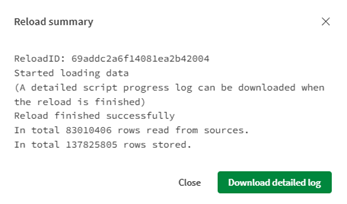
Timeout errors in the Qlik Cloud Scheduler are a known migration consideration and, with the right approach, entirely avoidable. SQL-side pagination offers a robust and maintainable solution for large tables that cannot be handled through standard incremental load strategies.
When scoping a migration from Qlik Data Transfer to Qlik Data Gateway, it is advisable to identify such tables early and include the appropriate extraction logic before moving to production.
If you need assistance with your migration or run into similar challenges, feel free to reach out to us at element61. Our team is happy to provide professional guidance and support.