


In my previous insight about Conversational BI, we explored how Genie and its Agent mode can act as an autonomous data analyst—performing multi-step reasoning and hypothesis testing to answer complex business questions.
But even the smartest agent is only as good as the instructions it receives. To move from generic AI responses to trusted, production-grade business insights, you need to provide the right context. In this final part of the series, we will dive into how to set up a Genie Space and explore the specific technical levers you can pull to ensure your AI isn't just "chatting," but actually delivering value.
Where does Databricks Genie retrieve its business context from
Genie does not perform well out of the box. While the initial setup of a Genie Space is straightforward, providing the right context is vital for its performance. Without a clear understanding of your specific business logic, the AI cannot provide reliable answers.
But how exactly should this context be provided? In this section, we dive into the different options, their advantages or disadvantages, and when to use what.
Pillar 1: Metric Views
What are Metric Views and how do you define them
Metric Views are essentially Databricks’ version of a semantic model defined in a YAML format. They act as the semantic layer—the vital "translation layer" between your raw data and the business language your users speak.
A Metric View is defined by a source (=your fact), its relations to dimensions, and business measures related to the fact. Databricks offers two integrated ways to configure a metric view:
- The User Interface (UI): Recently introduced to improve the user experience, the UI allows for a more visual and accessible setup when mapping your facts and dimensions for the first time.
- The YAML Structure: In the background, these definitions are stored in a structured YAML format. While the UI is excellent for accessibility, defining your model directly in YAML (or via SQL statements) unlocks enterprise advantages like easy parametrization, direct code updates, and—crucially—full version control.
Whether you prefer the UI or the code-first approach, the result is a structured definition that tells Genie exactly how your data fits together.
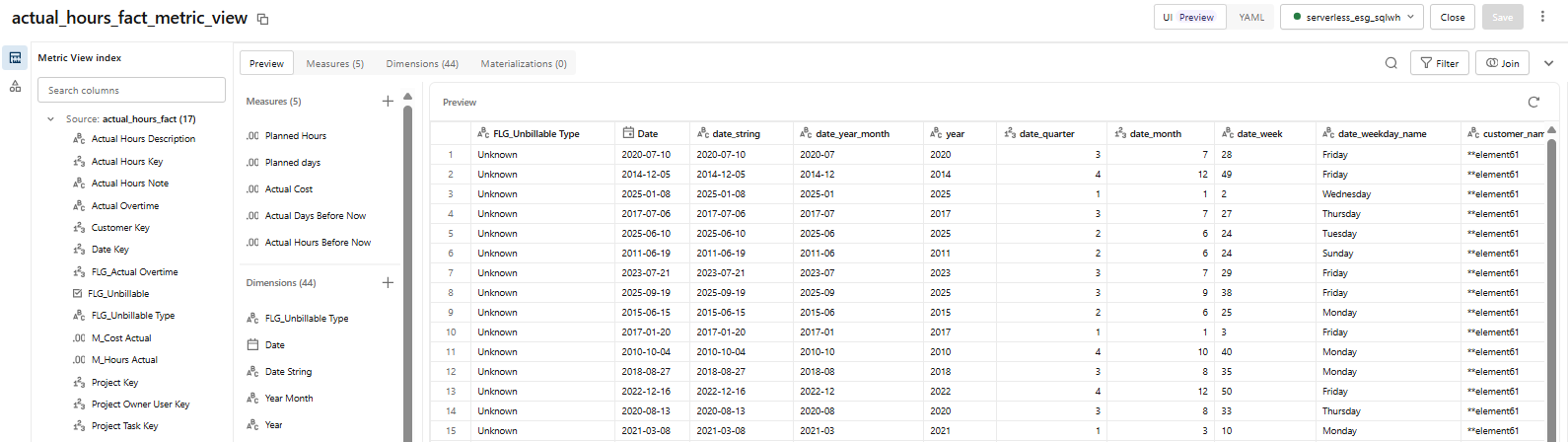
Figure 1: Metric views can be built through the UI and are stored as yaml-files
Why should you define Metric Views for your Genie Space
It is the place within Databricks to define and manage consistent, reusable and governed business metrics on your existing gold views and achieve your one-source-of-truth. To build this foundation, you should centralize and define the following elements:
- One View per Fact: You can see one Metric View as the semantic representation of one fact table.
- Dimension Mapping: Each column of a linked dimension needs to be defined in the YAML file to be accessible to Genie.
- SQL-Powered Logic: The measures are added at the end, where you define all your business logic in a SQL-like fashion.
- Enriched Metadata: Your Metric Views should also contain metadata such as descriptions, synonyms, formatting, and display names. These are easily added using the ‘Genie code’ (= the developer’s assistant in Databricks).
What are the main advantages of using Metric Views
While they require an initial setup, Metric Views offer significant benefits for enterprise-grade Conversational BI:
- A Version-Controlled Semantic Model: Since your model can be managed as code (YAML), you can track changes via Git and collaborate effectively.
- Governed Business Logic: Define your metrics once and reuse them across multiple Genie Spaces, ensuring consistency across your organization.
- Unified Governance via Unity Catalog: Because Metric Views live natively in Databricks, they are fully governed by Unity Catalog. This ensures that security and data access rights are always respected at the source.
Pillar 2: The Knowledge Store
Metric Views are powerful for building a single source of truth—but not every use case needs the same dimensions, measures, or synonyms. Sometimes you need to add specific context, define relationships between datasets, or combine data from multiple facts without touching your global Unity Catalog metadata.
That's exactly what the Knowledge Store is for.
The knowledge store is the place where you can add specific configuration to your Genie space for your use case without affecting your Unity Catalog metadata. For this purpose, the knowledge store provides three main tabs.
What information should you provide in the 'About' tab
The first configuration option is the About tab. This is where you define the foundational identity and infrastructure of your space:
- Ownership & Infrastructure: Here, you define the owner, find the unique ID of the space, and select the serverless or SQL warehouse cluster that end-users will use.
- User Guidance: This is also where you should add a space description and common questions. By doing so, the purpose of the space becomes immediately clear to users, providing them with the necessary context the moment they start.
How do you manage your data in the 'Data' tab
The second configuration option relates to the data you want to include in your space. While you can add all the tables of your semantic model and link them to keys here, there is little reason to do so if you have already defined reusable Metric Views that contain that information. Instead, this tab is best used for space-specific refinements:
- Space-Specific Metadata: This is ideal for cases where descriptions and synonyms should differ—for example, adapting the same data for an ‘Accounting’ space versus a ‘Sales’ space.
- Prompt Matching: This allows Genie to sample actual values to match user prompts, helping it understand data types and formatting patterns. For instance, thanks to prompt matching, Genie knows that ‘Artur Tyvaert’ corresponds to the stored structure ‘Tyvaert, Artur’. While this is enabled by default, it is always wise to check if the activation worked.
- Entity Matching: This allows Genie to store distinct values for up to 120 columns. This helps to match terminology to actual data values, such as the United States being stored as US.
- Dataset Simplification: You can hide columns that are irrelevant to the specific space. By limiting redundant columns and avoiding those with similar names, you significantly reduce the chance of AI confusion.
Note that tables and views with row filters and column masks are excluded from value sampling, which will impact performance. Although the inspection mode should still find the relevant format of your data, it might need more tries than without.
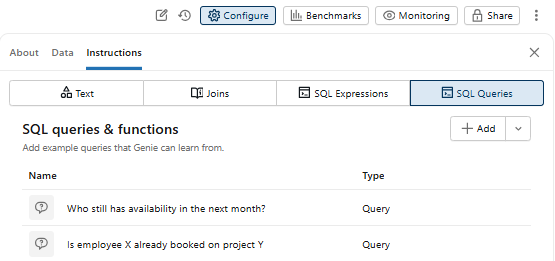
Figure 2: The knowledge store and its data tab
How do 'Instructions' improve the user experience in Genie Space
The Instructions tab is where you fine-tune your space to a specific business context and add logic that is difficult to capture in standard SQL. There are four sub-tabs available to give your space a competitive advantage:
- General Text Instructions: Use these to define how Genie should respond, rather than defining data logic. Provide information on formatting and add instructions on how to respond when user input is unclear. This last tip can increase the quality of the user questions, for example, by asking users for relevant filters if none are given.
- Defining Relationships through Joins: While most relationships are handled in your Metric Views, you can define extra joins here that are otherwise restricted. This is ideal for self-joins or joins between two facts. Note that Genie automatically links primary and foreign keys, so manual mapping for basic relationships is not necessary.
- Adding SQL Expressions: This is the place for measures that weren't defined in your Metric Views. A primary use case is creating measures based on information from two separate facts, as Metric Views are typically fact-specific.
- SQL Queries and Functions: This is the most critical area for building trust. If the business context is repeatedly misinterpreted, you can provide an SQL query as a guided example. Genie recognizes these as "Trusted" answers, ensuring consistency and confidence. Since your data is based on Metric Views, ensure your queries reference those same views.
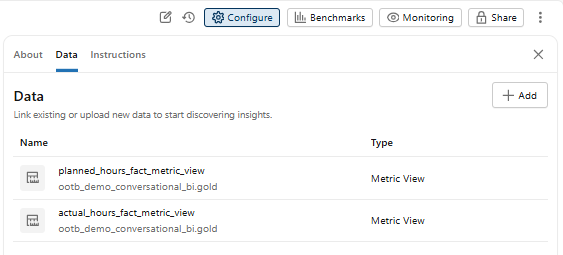
Figure 3: The knowledge store allows customization through a variety of options
Metric Views vs. The Knowledge Store: Which one to use
There are several ways to add context to Genie, and the right choice depends on your scope.
- Use a Metric View if you need to define general measures, synonyms, or dimensions that will be shared across multiple Genie spaces or dashboards. Define your business logic once, and it updates everywhere.
- Use the Knowledge Store if you need high customization for a specific use case, such as combining data between facts or providing business logic through specific SQL examples.
How do you manage context in an enterprise set-up
Metric Views are easy to maintain—change the YAML definition once, and every dependent object updates automatically. But what about the Knowledge Store? You don’t have to update each space manually through the UI. All configuration in a Genie Space can be exported via the Databricks API as a JSON object, edited centrally, and pushed back—making bulk updates and version control manageable at scale.
Comparison Overview: Choosing your approach
| Metric View | Knowledge Store | |
|---|---|---|
| Purpose | Define shared, reusable business logic once and use it across multiple Genie Spaces and dashboards | Add specific context, custom logic, and data combinations tailored to a single Genie Space |
| Use cases | Measures, synonyms, dimensions, KPI definitions | Combining facts, business logic via SQL queriess, and text instructions |
| Customisation level | Standardised — consistent across all consumers | High — fully tailored to your space |
| Version control | Managed via a central YAML file — update once, all dependent objects reflect the change automatically | Exported as a JSON object through the Databricks API — edit centrally and push updates back across spaces |
Ready to start the conversation
Throughout this series, we have seen that Conversational BI in Databricks and Microsoft Fabric is moving beyond simple "chatting with data." It is about building a reliable, governed business partner.
Choosing the right platform and the right configuration method is a nuanced decision that depends heavily on your organization's existing ecosystem and technical DNA. Whether you are navigating the move to a Lakehouse or fine-tuning your AI agents, we’re happy to think it through with you.
Reach out to us at element61, and let’s explore how this technology can transform your organization.
See it in action at Data Grillen 2026!
I’m excited to announce that I will be speaking at Data Grillen 2026 (May 20-21, Lingen) about the evolution of Conversational BI. Join me there to see these concepts in action, discuss the choice between Fabric and Databricks, and see how we can turn your data into a proactive partner.