

Qlik Answers and Qlik MCP Server: Elevating Qlik Cloud with Agentic AI
Qlik’s latest updates mark a major evolution in how users interact with analytics. With the introduction of Qlik Answers and the Qlik Model Context Protocol (MCP) Server, Qlik Cloud now brings together the reasoning power of frontier large language models, the associative engine, and both structured and unstructured knowledge. The result is a unified agentic AI experience that allows users to explore data conversationally, automate insights, and integrate Qlik intelligence directly into external AI tools such as Claude or ChatGPT, without compromising governance or security.
These enhancements change the role of Qlik in modern data ecosystems: from a platform for dashboards to a powerful, AI-augmented workspace for analysis, decision making, and development.
Qlik Answers: A Conversational Layer for both Knowledge and Data
Modern organizations face an explosion of data paired with rising expectations for speed and accuracy in decision-making. Leaders want answers quickly, but the information they rely on is often scattered: some in dashboards, some in documentation. Analysts lose valuable time switching between these sources or translating stakeholders’ questions into complex expressions or data model logic.
Qlik Answers offers a natural language interface capable of reasoning across documentation, curated knowledge bases, and now structured application data. It allows users to ask complex questions that span business logic, calculations, or multi-step workflows, returning answers that are grounded in Qlik’s governed datasets.
What sets it apart is its transparency and trustworthiness. Answers are supported by clear references to the sources and datasets used, ensuring users understand where insights originate. Beyond answering questions, Qlik Answers can also generate analytical assets such as new sheets or charts directly from conversational prompts. This lowers the barrier to insight creation and supports more interactive analytics experiences, both inside Qlik Cloud and in external applications where Qlik Answers can be embedded.
A sales manager can explore pipeline health using natural language instead of writing expressions or manually filtering data. A new employee can ask for help understanding key KPIs or interpreting script logic as they onboard. And because Qlik Answers can also generate sheets, visualizations, and entire analytical workflows, it removes friction from insight creation entirely.
The result is a dramatic acceleration in day-to-day decision cycles: not just faster answers, but better ones; personalized, contextual, and grounded in truth.
Enabling and Managing Qlik Answers
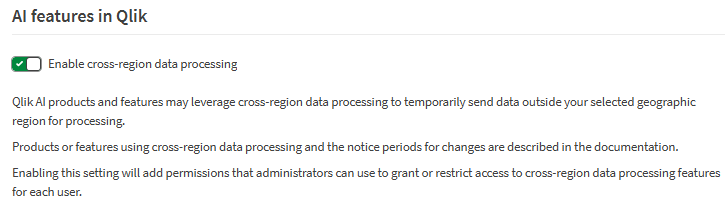
Because Qlik Answers relies on AI capabilities that may run outside the tenant’s default region, organizations must first enable cross-region data processing. This allows Qlik to temporarily process necessary data in AWS regions where the AI services reside.
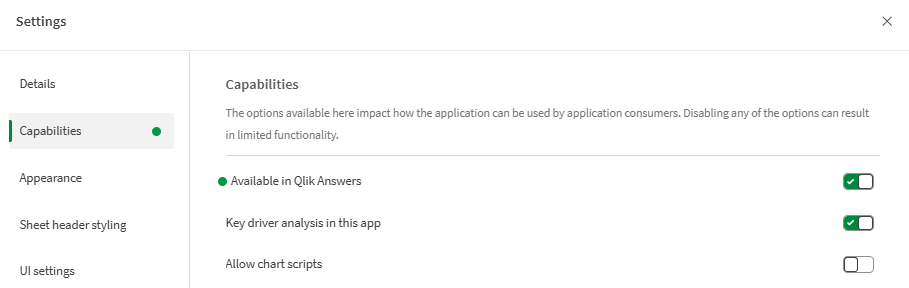
To enable structured data answering for a specific app:
In the Qlik app:
- Open Settings
- Navigate to Capabilities
- Enable Qlik Answers for structured data
Administrators can also configure access through roles, manage monthly question quotas, and monitor indexed knowledge base pages to ensure controlled and scalable use.
Qlik MCP Server: Bringing Qlik to External LLMs
In parallel, the Qlik MCP Server expands Qlik’s value beyond the walls of Qlik Cloud. Many teams today are spending more time in AI assistants, tools like ChatGPT, Claude, or enterprise LLM interfaces are becoming daily workspaces for analysis, documentation, research, and automation. Yet these assistants typically lack access to governed enterprise data, meaning their answers are often generic, incomplete, or unverifiable.
The Qlik MCP Server solves this by securely exposing Qlik’s analytics capabilities, data products, and agentic services directly to third party LLMs. This means an AI assistant can not only reason about your data but can actually act on it, running real calculations through the associative engine, retrieving governed datasets, and even generating Qlik application assets.
A user’s prompt is interpreted by the LLM, which selects the appropriate MCP tools. These requests are sent to the server, which uses Qlik APIs to execute the tasks and return results. This makes it possible to navigate apps, interpret load scripts, create visualizations, or generate business glossaries, all without leaving the LLM environment.
Imagine an analyst working in Claude who asks:
“I have a Sales app in my Personal space on my Qlik tenant. My CFO wants to have a new dashboard with the focus on Revenue and Profit of the most recent year in comparison to the year before. Also, add chart that show these measures together with some useful dimensions.”
Claude interprets the request, calls the appropriate MCP tools, and Qlik handles the calculations and sheet creation. The analyst never has to leave their AI workspace.
This creates a fundamentally new workflow: AI becomes the interface, Qlik becomes the engine powering it, and the user stays in complete control. It’s a frictionless, secure way to bring governed analytics into any environment where people prefer to work.
Setting Up Qlik MCP Server
Similar to Qlik Answers, enabling MCP requires cross-region data processing. From there, configuration is straightforward.
Administrator steps
- Enable Qlik MCP under
Features & actions → Agentic AI - Authenticate with the OAuth client once
- Assign user roles that allow MCP usage
Connecting an LLM (e.g., Claude)
- Go to Settings → Connectors → Add custom connector
- Provide a name
- Add the MCP server URL: https://<your-tenant-url>/api/ai/mcp
- Enter the Qlik static OAuth Client ID: 76d3f46e87655a50424bec7e0f0bb1e2
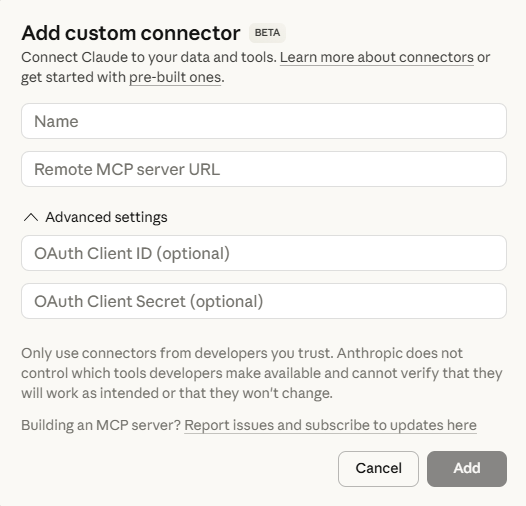
After authentication, the LLM can immediately interact with Qlik Cloud using the full set of MCP tools.
Licensing
Both Qlik Answers and the MCP server draw from the same monthly pool of question capacity, giving administrators a single point of governance for monitoring and managing usage. There is no extra charge for asking about structured data or triggering task automation flows, a question is a question, regardless of what it activates.
When using the MCP server, consumption occurs whenever an LLM issues Tool Calls to interact with Qlik. A Tool Call represents any action the model performs through Qlik’s capabilities, whether it’s querying data, calling an API, executing a calculation, or performing another engine backed operation.
In Qlik Cloud, monthly questions are available from a Standard Analytics Plan, 200 questions per month, onwards to 5000 questions per month with an Enterprise Analytics Plan, as well as the option to use it in Qlik Sense Enterprise SaaS. Extra bundles can be bought to specifically expand your Agentic AI experience in Qlik Cloud.
While Claude and ChatGPT seem to be working the best at this moment, connecting to other LLMs is possible by creating your own OAuth client in Qlik.
MCP is available for Claude and Claude Desktop for users on Pro, Max, Team, and Enterprise plans. For ChatGPT, you must be on a Team, Pro, or Plus plan to connect to the Qlik MCP.
Conclusion
Qlik Answers and the Qlik MCP Server represent a major step forward in bringing agentic AI into Qlik Cloud. Qlik Answers delivers a conversational, transparent way to explore both structured data and unstructured knowledge, while the MCP Server brings the power of the associative engine directly into external LLM environments. Together, they enable users to generate insights faster, automate analytical workflows, and extend Qlik intelligence beyond traditional dashboards.
Looking ahead, capabilities like the Discovery Agent will further strengthen Qlik’s role as a central AI platform, ensuring that insights are not only easy to generate but also trustworthy, proactive, and grounded in high-quality data.
If you are keen to learn more, do reach out via the element61 contact form.